Roles and permissions
What the built-in Owner, Office and Crew roles can see and do.
Every person has one role. A role is a set of permissions. Three roles are built in, and on the Growth plan you can make your own.
The built-in roles
| Role | Who it's for | What they can do |
|---|---|---|
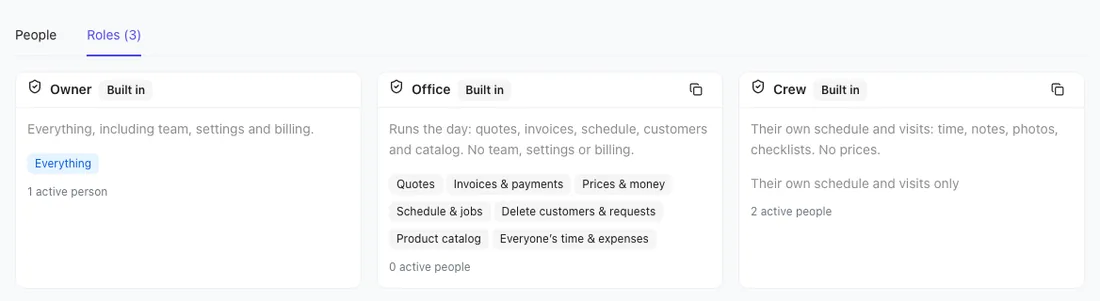
| Owner | You, and partners | Everything, including team, settings and billing. |
| Office | Office manager, dispatcher | Runs the day: quotes, invoices, prices, the schedule, customers, the catalog and everyone's time. No team, settings or billing. |
| Crew | Technicians, installers | Their own schedule and visits: time, notes, photos and checklists. No prices. |
What everyone can do
Every role, including Crew, can:
- See their own schedule and visits.
- Clock in and out, and add notes, photos and checklist ticks to their visits.
- View customers.
- Log their own expenses (on plans with expenses).
The permissions
Roles are built from these. See each role's list on the Roles tab of Settings → Team & roles.
| Permission | Lets someone |
|---|---|
| Quotes | Create, edit and send quotes; turn requests into quotes. |
| Invoices & payments | Create and send invoices, record payments. |
| Prices & money | See prices, balances, the dashboard, reports, revenue goals and job costing. |
| Schedule & jobs | Create and edit jobs; schedule, move and assign anyone's visits. |
| Delete customers & requests | Delete customers and requests; share Client Hub links; use Texts (with the texting add-on). |
| Product catalog | Add, edit and delete catalog items. |
| Everyone's time & expenses | See and edit the whole team's time and expenses. |
| Team & roles | Add, edit and remove users; manage roles; see the activity log. |
| Business settings | Branding, website, payments setup, quote and invoice settings, automations, online booking, custom fields. |
| Hello to Paid billing | Choose and pay for the Hello to Paid plan. |
Office has the first seven. Crew has none of them. Owner has all ten.
What Crew sees
- Menu items they don't have permission for are hidden, like Proposals, Invoices, Dashboard, Reports and Settings. They start on the Schedule instead of the Dashboard.
- Jobs show without prices or totals, and the web shows the job as view only.
- They can only update visits they're assigned to, and can't reschedule or reassign them.
- In the app, crew get the Today, Schedule, Customers and More tabs. See The app for crews.
Change someone's role
Open Settings → Team & roles and pick a new role in their row. See Add and remove people.
Tip: Built-in roles can't be edited. On Growth, copy one and change the copy. See Custom roles.