High-value quote alerts
Get a phone alert and an email the moment a big quote is opened or signed, or when it's gone quiet, so you can call at the right time.
Included on the Pro plan and up. Compare plans New and rolling out: if you don’t see it yet, ask us to switch it on.
Big jobs deserve a phone call at the right moment. Set a dollar amount, and any quote at or over it alerts you when your customer opens it, signs it, or goes quiet.
Turn it on
- Open Settings → Proposals.
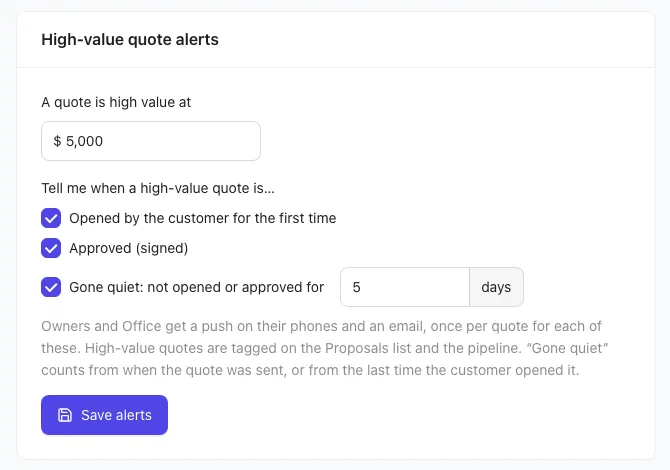
- In High-value quote alerts, set A quote is high value at (for example $5,000).
- Under Tell me when a high-value quote is…, tick what you want to hear about: Opened by the customer for the first time, Approved (signed), and Gone quiet: not opened or approved for a number of days (1 to 60).
- Click Save alerts.
You need a role with Business settings to change these.
Who gets the alerts
Owners, Office staff and anyone whose role includes Business settings get:
- A push notification on the iPhone or iPad app, like "Big quote opened". Tap it to open the quote.
- An email with a button to open the quote.
Each kind of alert goes out once per quote. "Gone quiet" counts from when the quote was sent, or from the last time your customer opened it, and is sent during your working day.
Opening the link yourself while signed in doesn't count as your customer opening it.
Spot big quotes at a glance
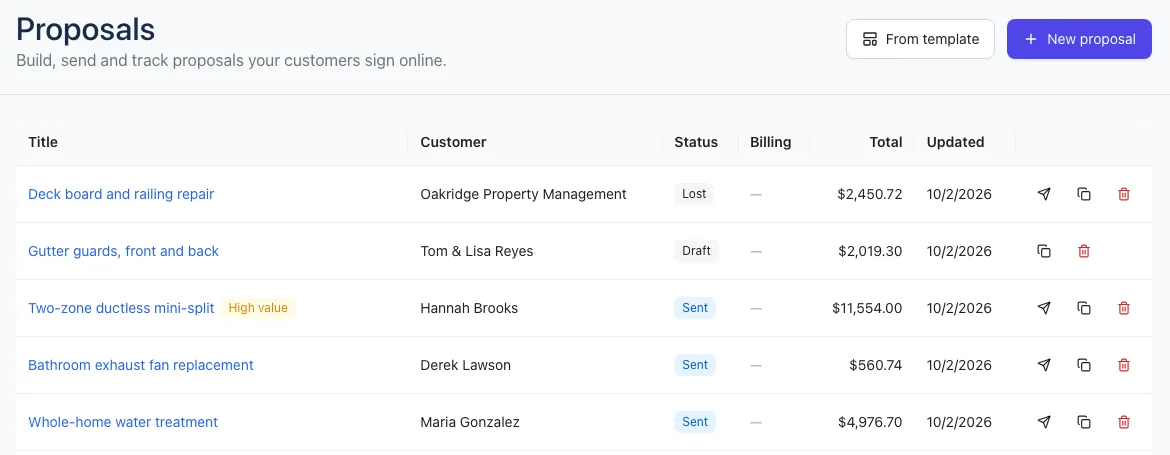
High-value quotes show a gold High value tag on the Proposals list and on the sales pipeline.