Find a time for a visit
Let Hello to Paid suggest the best open slots for a visit, by who's free and who's already working nearby.
Included on the Growth plan. Compare plans New and rolling out: if you don’t see it yet, ask us to switch it on.
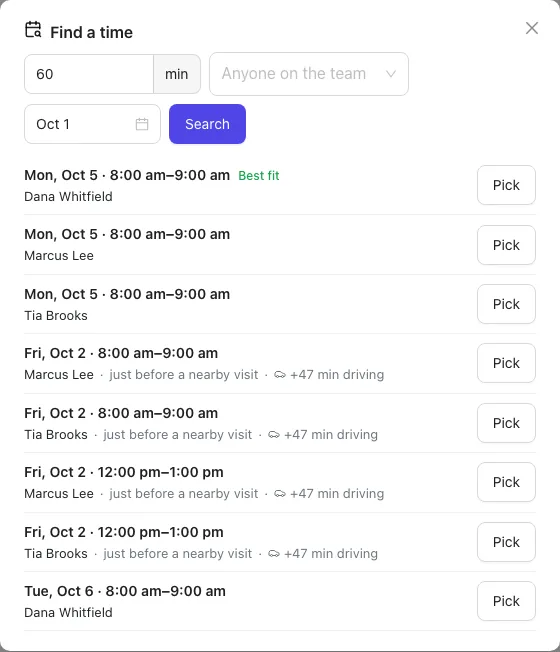
Find a time looks at the next week of your team's schedule and suggests open slots for a visit. It ranks them by how little extra driving each one adds and how soon it is, so a visit near someone's other job comes first.
Book a new visit into an open slot
- Open the job in Work → Jobs.
- On the Schedule card, click Find a time.
- The suggestions appear. Each shows the day and time, the person, where it fits in their day (for example "right after a nearby visit" or "nothing else booked") and the extra driving, like +15 min driving. The top one is marked Best fit.
- Click Pick next to the one you want.
The visit is booked at that time with that person, and you'll see a message confirming it.
Move an existing visit
- Open the visit (from the Schedule or the job).
- Click Find a time next to the date and time.
- Click Pick on a slot. The date, time and team fill in.
- Click Save to keep it.
Narrow the search
At the top of the Find a time window you can change:
- Length: how long the visit takes, in minutes.
- Who: pick one or more people, or leave it as Anyone on the team.
- Start date: the first day to look from. It searches the 7 days from there.
Then click Search. If nothing is open, try a shorter visit, another week or more people.
How slots are chosen
- Slots fall inside your business hours: the hours set in Settings → Online booking (or 8am to 5pm, Monday to Friday, if you haven't set them).
- They never overlap a visit someone already has at a set time.
- Driving is worked out from where the job is and the nearby visits on that person's day. A job is on the map when its service address (or its customer's address) was picked from the address suggestions. A typed address that wasn't picked from the list isn't on the map, so that slot shows no driving.
Only people who can schedule jobs (Owners and office staff) see Find a time.
Tip: Want customers to book open times themselves? See Online booking.