Progress invoicing
Bill a big signed quote in stages, by percentage, set amount or picked items, until it's fully invoiced.
Included on every plan. New and rolling out: if you don’t see it yet, ask us to switch it on.
For a big job you don't want to wait until the end to get paid. Progress invoicing lets you bill a signed quote in parts: 30% when materials arrive, 40% at rough-in, the rest when it's done. Hello to Paid keeps track of what's been billed, so the stages always add up to the quote, to the cent.
Where to find it
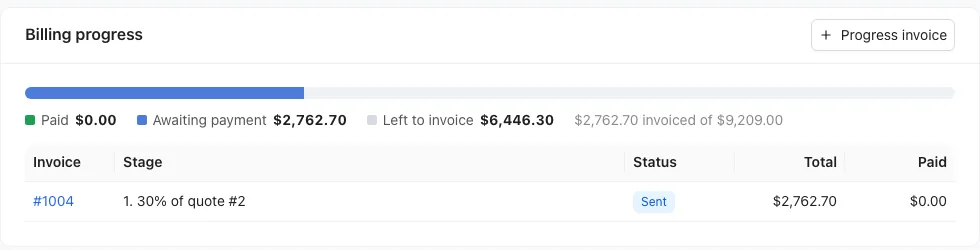
Open a signed quote in Work → Proposals. The Billing progress card near the top shows:
- A bar split into Paid, Awaiting payment and Left to invoice
- Every stage invoice so far, with its status, total and what's been paid
Bill a stage
- On the signed quote, click Progress invoice in the Billing progress card.
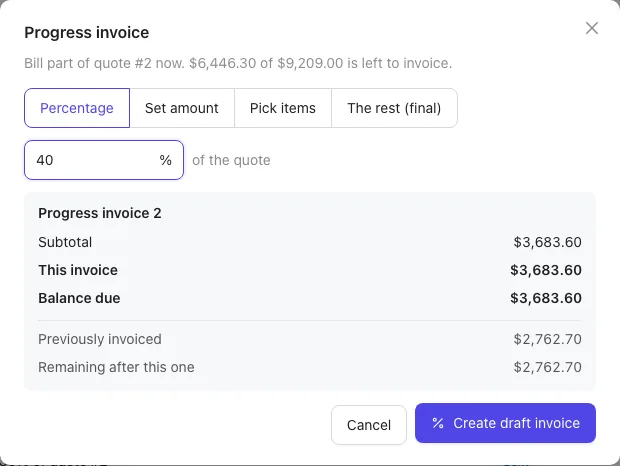
- Choose how much to bill now: Percentage (a share of the quote, like 30%), Set amount (a dollar amount, like $2,500), Pick items (tick lines from the quote; lines already billed show Invoiced) or The rest (final) (everything not billed yet).
- Check the preview: this invoice's total, the balance due, what's been invoiced before and what's left after this one.
- If your customer paid a deposit, leave Credit the deposit on this invoice on to take it off this stage, or turn it off to credit it later. The final invoice always takes any deposit that's still waiting.
- Click Create draft invoice.
The draft invoice opens. It's an ordinary invoice: check it and click Send invoice. See Create and send an invoice.
How the money works
- Percentages and amounts are of the quote's total after any discount and before tax. If the quote has sales tax, it's added on top of each stage at the quote's rate.
- Picked items carry the quote's discount with them.
- You can't bill more than what's left. If you try, you'll see how much is left to bill.
- The rest (final) bills exactly what's left, so the stages always add up to the quote.
What you and your customer see
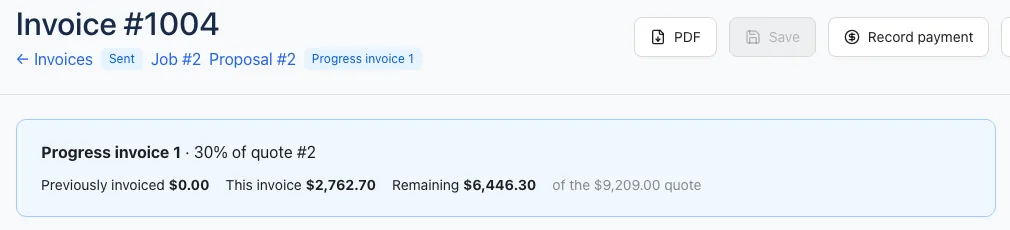
Each stage invoice shows a banner like "Progress invoice 1 · 30% of quote #2", with Previously invoiced, This invoice and Remaining. Your customer's invoice page shows the same lines, so they always know where the job stands.
Fix a stage
- Void a stage invoice to free up its share; you can then bill it again.
- Once you bill a quote in stages, the quote's Create invoice button goes away; use Progress invoice for the rest. On the job, the invoice button opens the latest stage.
- If you've already made one invoice for the whole quote, you'll see a note on the card. To bill in stages instead, void that invoice first.