The sales pipeline in the app
Every open request and quote by stage, with its value and how long it's waited. Tap one to open it.
Included on the Growth plan. Compare plans
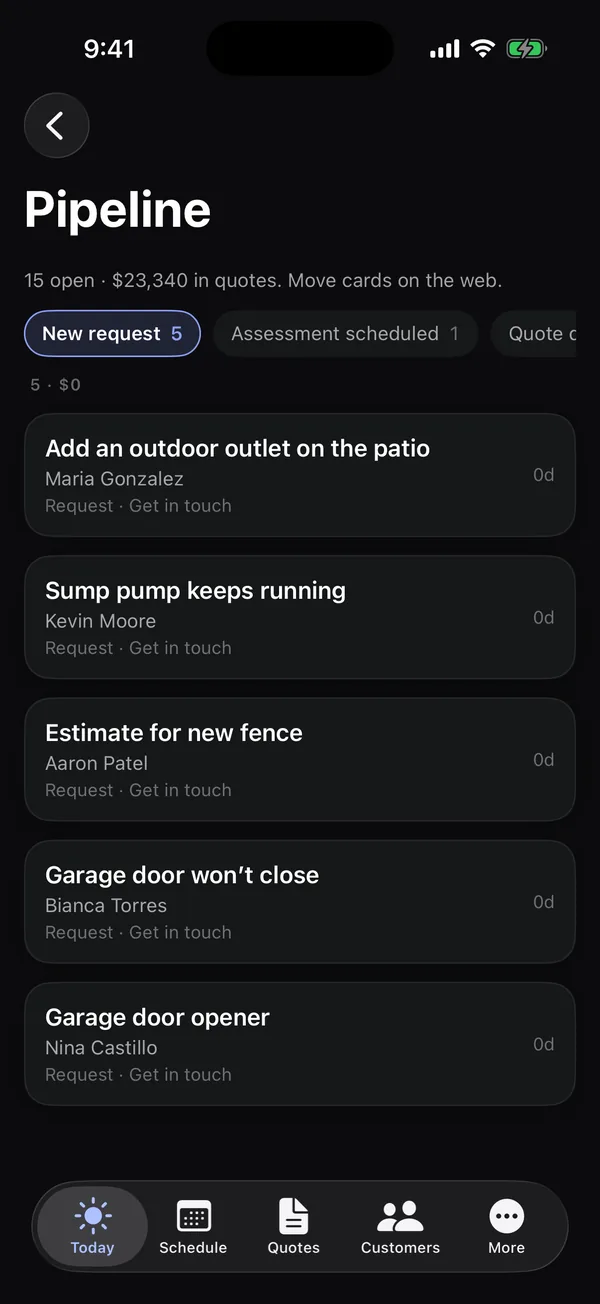
Open More → Pipeline to see your sales at a glance: requests and quotes grouped by stage, the same as the board on the web. It's there for people who can work on quotes.
Read it
- The line at the top shows how many are open and, if you see prices, how much is in quotes.
- The row of stages scrolls sideways. Each shows how many cards it has. Tap a stage to see its cards. Won and Lost show the last 30 days.
- Each card shows the request or quote, the customer, what to do next, its value, how many days it's been in this stage (like 4d), and any flags.
Tap a card to open the request or quote.
Moving cards
The pipeline in the app is for looking. To move a card to another stage, use the board on the web. Cards also move by themselves as work happens, like when a quote is sent or signed.