Find your way around the app
The tabs at the bottom, what's under More, and why some people see more than others.
The app has up to five tabs along the bottom. Which ones you see depends on your role and your kind of business.
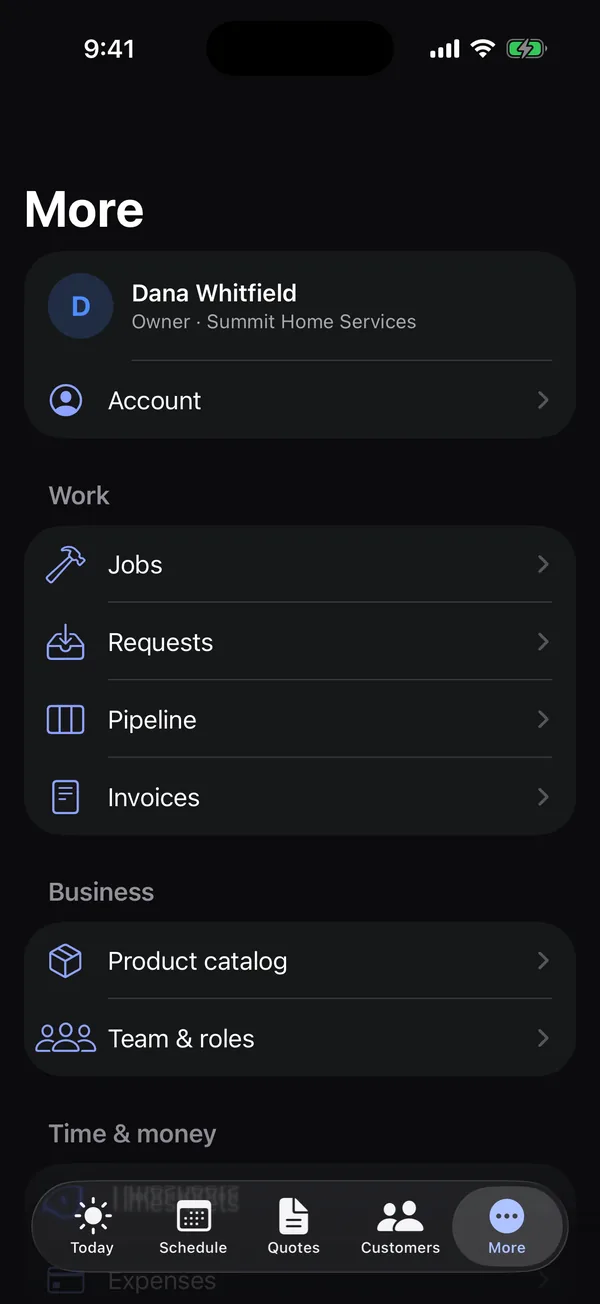
The tabs
| Tab | What's there |
|---|---|
| Today | Your clock, today's visits and, if you see money, what's owed and paid. See Today and the time clock. |
| Schedule | The week's visits, day by day. See Your schedule in the app. |
| Quotes | Every quote, plus building and signing new ones. Only for people allowed to work on quotes. See Quotes in the app. |
| Customers | Everyone you work for. See Customers in the app. |
| More | Everything else, listed below. |
What's under More
- Account: your name, sign-in email and password. See Your account, help and signing out.
- Work: Jobs, Requests, Pipeline and Invoices.
- Business: Product catalog and Team & roles.
- Time & money: Timesheets and Expenses.
- Help & support: the help center, this guide and Contact support.
- Open Hello to Paid on the web and Sign out.
A row only shows if your role allows it. Settings, your website, billing and plans are managed on the web.
Who sees what
| Owner | Office | Crew | |
|---|---|---|---|
| Today, Schedule, Customers | Yes | Yes | Yes (their own visits) |
| Prices, totals and money tiles | Yes | Yes | No |
| Quotes tab and Pipeline | Yes | Yes | No |
| Invoices | Yes | Yes | No |
| Everyone's visits and timesheets | Yes | Yes | No, only their own |
| Team & roles | Yes | No | No |
Custom roles get whatever their permissions allow. See Roles and permissions and The app for crews.
A lock next to something
A lock means your plan doesn't include that feature. Open it to see what it is. Owners get a See plans button; everyone else is asked to talk to the account owner. See Why is a feature locked?.
Your business's own words
Some kinds of business use different words, and the app follows them. For example, an engineering firm sees Clients, Projects, Inquiries, Fee schedule and Principal instead of Customers, Jobs, Requests, Product catalog and Owner, and doesn't see the Schedule tab or Jobs. Screens your business doesn't use are hidden.
A notice at the top of Today
- This account is read-only: the trial ended, a payment failed or the subscription was canceled. You can still look at everything and record payments. See Read-only mode.
- Your free trial ends in 3 days: owners see this during the last week of a trial.